


LIKUID.COM...
Estonian
Vali keel
Estonian
  • العربية
  • Azerbaijani
  • Català
  • 中文
  • Hrvatski
  • Čeština
  • Dansk
  • Nederlands
  • English
  • English
  • Estonian
  • Persian
  • Français
  • Deutsch
  • עברית
  • Magyar
  • Italiano
  • Macedonian
  • Norwegian
  • Português
  • Português
  • Română
  • Русский
  • Español
  • Svenska
  • Türkçe
  • Українська
Teatised
0
Teil pole praegu märguandeid.
0
Logi sisse - See leht on piiratud
Unustasid salasõna? või Registreeri
+ (1) 514-667-2245
LIKUID.COM LIKUID.COM
  • Shared Hosting

    Dedicated Server

    Cloud VPS

    WordPress Hosting

    Domains

    Developer Hosting

  • Knowledgebase

    Announcements
    Teated

    Vaata meie viimaseid uudiseid ja teateid

    Open Ticket
    Ava päring

    Minu klienditoe päringud

    +(1) 514.667.2245
    +(1) 877.777.1719
    Võta meiega ühendust
  • Kliendi sisselogimine
LIKUID.COM LIKUID.COM
Support
Teated Võta meiega ühendust
CLIENT AREA

Teadmistebaas

Comment supprimer la cache.
Courriels
cPanel - Utilisation, Gestion, Configuration compte
FTP - Comment transférer des fichiers
MySQL - Base de données
WordPress - Comment utiliser WordPress
Minu klienditoe päringud Teated Teadmistebaas Allalaetav Võrgu staatus Ava päring

Comment installer wordpress avec softaculous

1- Dans le cPanel, ouvrir l'outil "softaculous".


2- Cliquer dans sur "Wordpress"


3- Cliquer sur "Install now"


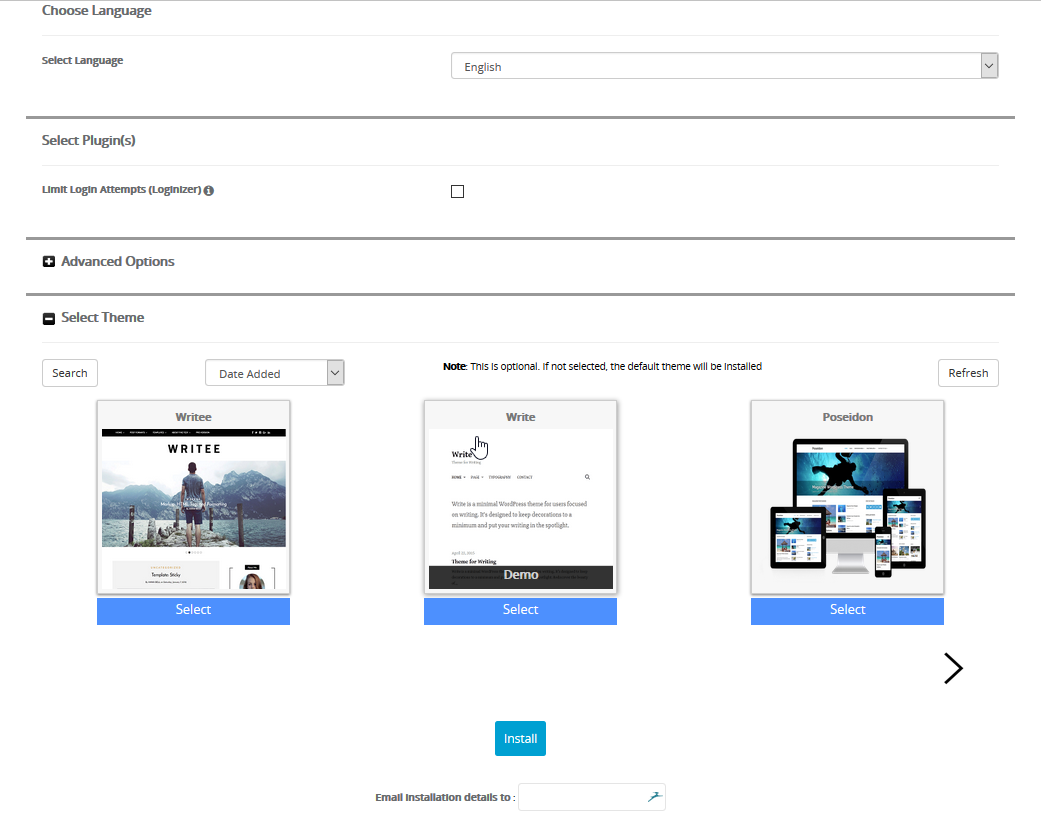
4- Configurer votre site comme vous voulez. Toutefois, il très important de laisser le champs "In directory" vide. Autrement, votre site aura la nomenclature suivante : nomdedomaine.com/nomdurépertoire


5- Cliquer sur "Install"


Kas see vastus oli kasulik? 1 Kasutajad peavad seda kasulikuks

Seotud artiklid

How to install WordPress This tutorial will show you how to install WordPress. For this tutorial, you will need to go to...
How to configure your settings in WordPress This tutorial assumes you've already logged in to WordPress, and will show you how to configure your...
How to change your password in WordPress This tutorial assumes you've already logged in to WordPress, and will show you how to change your...
How to edit your profile in WordPress This tutorial assumes you've already logged in to WordPress, and will show you how to edit your profile....
How to change your header in WordPress This tutorial assumes you've already logged in to WordPress, and will show you how to change your header...
Array
logo Antler logo Antler
Autoriõigus © 2026 LIKUID.COM. Kõik õigused kaitstud.

Title

Loading... Laeb…
Loading...

Parooli genereerimine

Palun sisestage parooli pikkuse jaoks number vahemikus 8 kuni 64